Your members. Your money. Every event.
Inside MemberOS, EventOS adds the whole event lifecycle to the member record, shop and payments you already have. To staff and members it feels like one system.
EventOS inside MemberOS is association event management that already knows your members. MemberOS keeps the members, the money and the CRM. EventOS adds the whole event, from brief to close-out. To staff and members it feels like one system.
- One login: staff open EventOS from the MemberOS menu. No second password.
- Access follows each person's MemberOS role, so there is one place to manage people.
- Publish once and the event appears in your website shop and member portal.
- Members book with member pricing in the checkout they already use, in one cart.
- One ticket email from MemberOS, carrying the pass link.
- Session scans become CPD on the member's MemberOS transcript.
- Switched on one event at a time, with pause and rollback.
Three ways to run it
- EventOS on its own. Any organiser can run the whole event in EventOS, with its own registration and payments. EventOS on its own
- MemberOS on its own. MemberOS already handles simple events: registration, member pricing, attendance and CPD certificates. Event management in MemberOS
- EventOS inside MemberOS. The full event lifecycle on top of the member record, shop, payments and CPD transcripts you already have. This is where both products give the most value.
Who owns what?
One owner for every piece of data, so nothing is entered twice.
- MemberOS owns people: members, contacts and memberships. EventOS reads a summary when it needs one, such as how many members are in a state.
- MemberOS owns the money: the shop, the checkout, payments and refunds, accounting, and the one ticket email.
- EventOS owns the event: title, dates, ticket types and prices (shown in the MemberOS shop, edited in one place), the programme, seating, passes, check-in and the CPD evidence.
Each system does what it is best at. Neither copies the other. EventOS never holds a second copy of your member database or your payment keys.
How does an event flow?
- 1. Publish. The event is built and published in EventOS, with its tickets and prices.
- 2. List. MemberOS lists it on your website, in the shop and in the member portal.
- 3. Buy. A member buys through the checkout they already use, with your own payment account.
- 4. Register. The paid order flows to EventOS, which registers them, seats them and signs their pass.
- 5. Pass. The pass comes back to MemberOS, in the member portal and the ticket email.
- 6. CPD. On the day, their scans become CPD points on their MemberOS transcript.
Staff publish once. Everything else flows.
What does finance see?
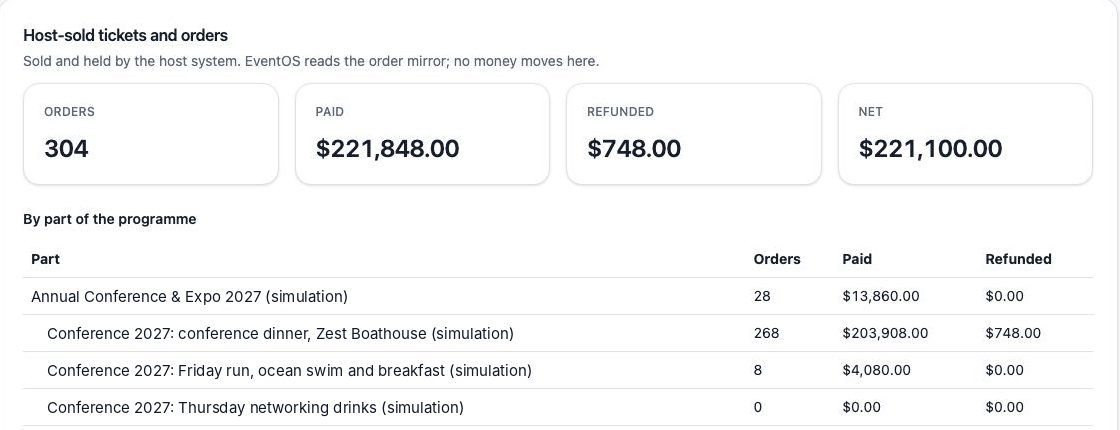
Nothing new to reconcile. Tickets are sold through your own payment account and post to your accounting system through the existing sync. Sponsor invoices are raised through MemberOS too. EventOS receives each sale and shows it in the event budget, and only event lines count towards the event. Automations, Stripe and Xero
Every event makes the member record richer
The member record in MemberOS stays the master. Each event adds what the member attended, spent and earned in CPD, and members update their details once. Each sponsor or exhibitor company in EventOS is linked to its MemberOS CRM record. That gives the association its next campaign: the people who came, the people who did not, and the people who went to a particular stream.
Ask for it in plain English
Staff can ask how an event went against budget and the assistant answers from the live event, scoped to their role. It drafts the board summary but never sends or approves. Today that assistant works inside EventOS; answering events questions inside the main MemberOS Brain comes next. How the Brain works
Start with one event
New features ship switched off. The first event goes on an allow-list and is tested end to end with controlled purchases, passes, check-in and CPD before anyone is invited. Everything else you sell, such as webinars and memberships, never touches EventOS.
See also: How EventOS works · CPD from session scans · Membership and the Brain
Questions
- Do staff need a separate EventOS login?
- No. Staff open EventOS from the MemberOS menu with the login they already use, and land in their EventOS workspace with the right permissions.
- Who gets access to EventOS?
- Access follows each person's MemberOS role: an organisation administrator becomes an EventOS administrator, staff become planners and finance staff get the finance role. Members see events through the shop and their portal, not the staff tools. Change a role in MemberOS and EventOS follows at the next sign-in.
- Which system holds the member record and the money?
- MemberOS stays the master for people and money: members, memberships, the shop, payments, refunds and accounting. EventOS owns the event: programme, seating, passes, check-in and CPD evidence. Each system does what it is best at, and neither copies the other.
- Will members get two confirmation emails?
- No. MemberOS sends its usual ticket email, and for an EventOS event that email carries the pass link. The pass also sits in the member portal under My events.
- How do we switch it on without risk?
- One event at a time. The first event goes on an allow-list and is tested end to end before anyone is invited. It can be paused (new sales stop, sold tickets stay valid) or fully rolled back, and everything else you sell is untouched.